
How the VUEROID S1 Records Events in Parking Mode
Parking mode is one of the most important features of a dash cam, but understanding exactly how events are recorded can sometimes be confusing.
The VUEROID S1 offers two parking recording modes—Impact & Motion and Impact + Timelapse—and their behavior changes depending on whether Extreme Low Power Mode (ELPM) is active.
In this guide, you’ll learn how each parking mode works, how ELPM affects recording behavior, and where your recorded files are saved.
Understanding Extreme Low Power Mode (ELPM)
Before looking at each parking mode, it’s important to understand how Extreme Low Power Mode (ELPM) works.
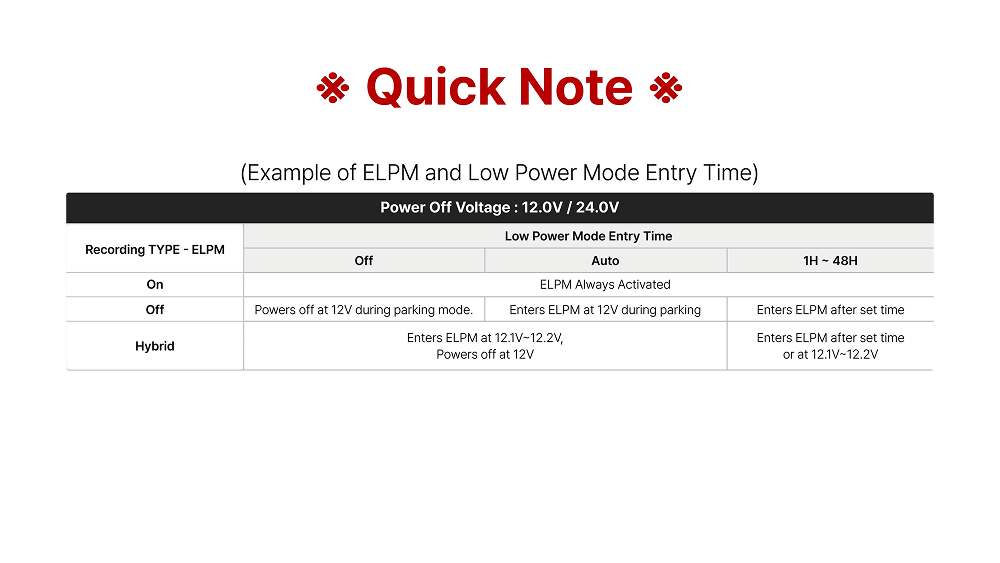
Within the Extreme Low Power Parking Mode settings, you’ll see three options:
- Off
- On
- Hybrid
Although these appear to be different modes, they do not change the recording method.
Instead, they determine when the dash cam enters ELPM based on your selected Low Power Mode Entry Time settings.
In other words, the VUEROID S1 only has two operating states:
- ELPM Active
- ELPM Inactive
The Off, On, and Hybrid options simply control the conditions that trigger the transition into ELPM.
Parking Mode 1: Impact & Motion
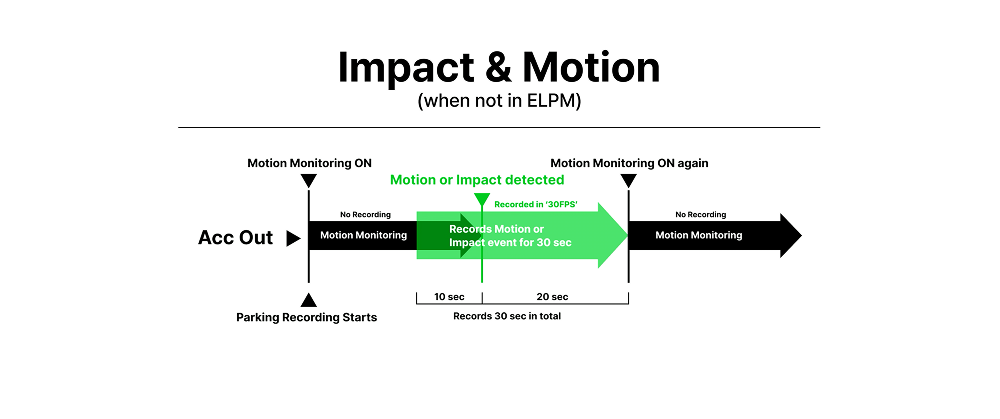
When ELPM Is Not Active
When the dash cam is operating normally in Parking Mode:
If an impact is detected, the S1 saves:
- 10 seconds before the event
- 20 seconds after the event
A 30-second video is recorded at 30 FPS.
Saved files:
- P Event → Impact events
- Park → Motion detection events
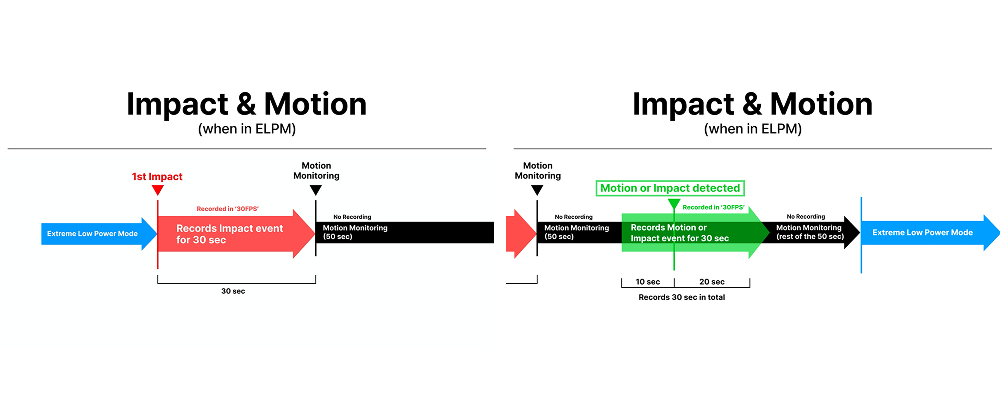
When ELPM Is Active
Once the S1 has entered Extreme Low Power Mode, recording behavior changes to maximize power efficiency.
When an impact is detected:
- The S1 immediately wakes up.
- It records 30 seconds at 30 FPS after the impact.
- The camera then remains awake for 50 seconds while monitoring for motion.
If another impact or motion is detected during this monitoring period:
- An additional 30-second event recording is created using:
- 10 seconds before the event
- 20 seconds after the event
Once motion monitoring finishes, the S1 automatically returns to ELPM.
If the initial 30-second recording extends beyond the 50-second monitoring period, the recording is completed first before the camera returns to low power mode.
Parking Mode 2: Impact + Timelapse
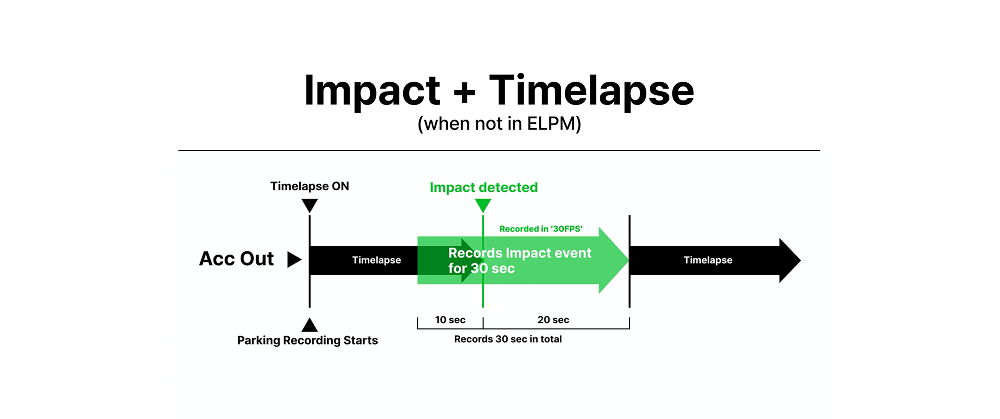
When ELPM Is Not Active
Without ELPM, the S1 continuously records in Time Lapse whenever no impact is detected.
If an impact occurs:
- A 30-second event recording is created using:
- 10 seconds before the impact
- 20 seconds after the impact
At the same time, the Time Lapse footage recorded immediately before the impact is also saved.
Time Lapse recording is stored as:
- 100 seconds recorded
- 20-second playback
- 5 FPS
This recording cycle repeats continuously while Parking Mode remains active.
Saved files:
-
- P Event → Impact recordings
- Park → Time Lapse recordings
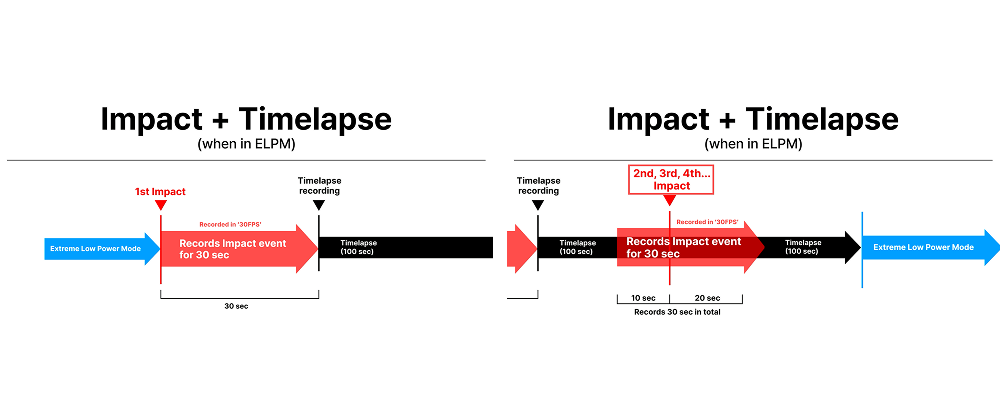
When ELPM Is Active
When the S1 is operating in ELPM:
- An impact wakes the camera.
- The S1 records 30 seconds at 30 FPS.
- After recording the event, the camera switches to Time Lapse recording for 100 seconds.
If another impact occurs during the Time Lapse recording period:
- Another 30-second event recording is created using:
- 10 seconds before the impact
- 20 seconds after the impact
After recording the additional event, the S1 resumes Time Lapse recording before returning to ELPM.
Final Thoughts
Understanding how Parking Mode and Extreme Low Power Mode (ELPM) work together makes it easier to choose the recording mode that best fits your driving and parking environment.
Whether you prefer Impact & Motion for active motion monitoring or Impact + Timelapse for extended coverage with efficient storage usage, the VUEROID S1 is designed to capture important parking events while balancing power consumption and recording performance.