
H1 QHD
Manual Download
| No. | NAME | LANGUAGE | DOWNLOAD | Date |
| 2 |
New H1 QHD Infinite_User Guide_v.1.0
|
ENG | 11:43 | |
| 1 |
New H1 QHD Infinite_Full Manual_v.1.0
|
ENG | 11:39 |
S1 4K Infinite
Manual Download
| No. | NAME | LANGUAGE | DOWNLOAD | Date |
| 1 |
S1 4K Infinite_Full Manual_v.1.3
|
ENG | 2026.08.03 |
S1 QHD Infinite
Manual Download
| No. | NAME | LANGUAGE | DOWNLOAD | Date |
| 1 |
S1 QHD Infinite_Full Manual_v.1.2
|
ENG | 2026.08.03 |
D22 4K
Manual Download
| No. | NAME | LANGUAGE | DOWNLOAD | Date |
| 1 |
VUEROID_D22-4K_MANUAL_FULL_V1.0
|
ENG | 2026.08.28 |
D40-Q2
Manual Download
| No. | NAME | LANGUAGE | DOWNLOAD | Date |
| 1 |
VUEROID_D40-Q2 2CH_quick_manual
|
ENG | 2026.03.18 |
D21 4K
Manual Download
D21 LTE FHD
Manual Download
| No. | NAME | LANGUAGE | DOWNLOAD | Date |
| 1 |
VUEROID_D21 LTE FHD_QUICK MANUAL
|
ENG | 2026.03.18 |
D20-Q2 Plus
Manual Download
| No. | NAME | LANGUAGE | DOWNLOAD | Date |
| 1 |
VUEROID_D20-Q2-PLUS_QUICK-MANUAL
|
ENG | 2026.03.18 |
D20-F2/F2E
Manual Download
| No. | NAME | LANGUAGE | DOWNLOAD | Date |
| 1 |
VUEROID_D20-F2/F2E_quick_manual
|
ENG | 2026.03.18 |
ZERO FHD
Manual Download
D10-F2W
Manual Download
Firmware Upgrade Guide
Firmware Update Instructions
Please do the following steps.
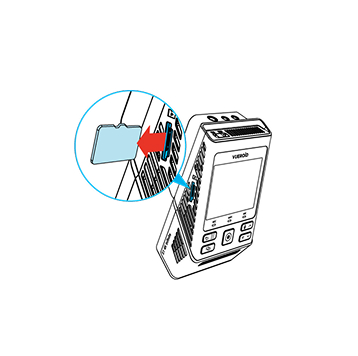
1
Turn off the unit and remove Micro SD Card. Insert it into your computer.

2
Download the latest firmware.
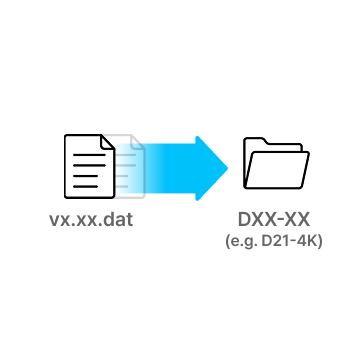
3
Unzip the firmware file and copy the .DAT file to the root directory of SD Card.
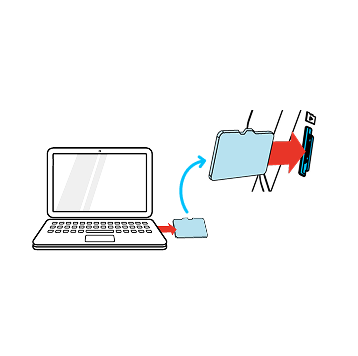
4
Eject Micro SD Card from computer and insert it into the device.
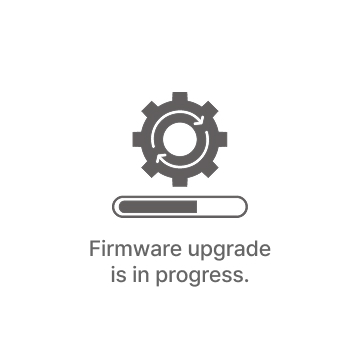
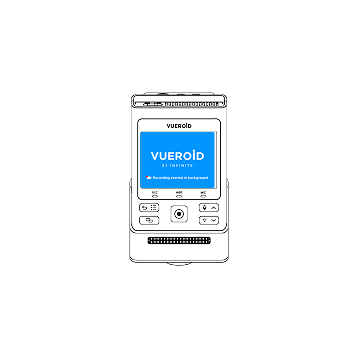
5
Turn on the device. The firmware upgrade will start automatically.
6
Once the firmware upgrade is complete, the device will automatically restart. You can then continue using the device.
*Firmware updates are available via the VUEROID HUB App and are processed automatically once the device is connected.
H1 QHD
Firmware Download
Firmware Update Notes
S1 4K Infinite
Firmware Download
Firmware Update Notes
- Updated Parking Impact Sensitivity
: Adjusted the “Sensitive” setting for Parking Impact under Event Sensitivity to detect smaller impacts while parked.
NOTICE
Before updating firmware via SD card, please update the VUEROID app to the latest version.
S1 QHD Infinite
Firmware Download
Firmware Update Notes
- Improved Infinite Plate Capture(IPC) image tuning
: Reduced overly enhanced white edges in daytime scenes.
: Reduced sky noise in early evening conditions. - Improved Premium Night Vision (PNV) image tuning
: Adjusted PNV brightness to deliver a brighter nighttime image than HDR mode.
D22-4K
Firmware Download
Firmware Update Notes
D40-Q2
Firmware Download
Firmware Update Notes
- Added Multi-Language Voice Packs
- Added Smart Low Power Mode
- Added Parking Recording Delay Mode (No Delay/ 90 Sec/ 3 Min)
- Added Auto REC Off Zone (Geofence-Based)
- Added Front & Rear Camera Rotation On/Off
- Improved HDR Timer
- Improved speaker volume level
- Added Support for Automatic SD Card Formatting
D21 4K
Firmware Download
Firmware Update Notes
- Added Cyber Security features.
- Fixed an issue where the language version was displayed incorrectly.
D21 LTE FHD
Firmware Download
Firmware Update Notes
- Updated menu icons (Up/Down → Back / Up & Down)
- Revised Stamp settings menu (Brand model, firmware version, date & time, channel, voltage, video GPS speed, GPS coordinates, enhancement, frame rate, watermark, color — 4 options)
- Added Power Off function via long press of the OK button during parking mode transition
- Added Time Zone support
- Added GPS disconnected icon
- Seamless VOD playback over a Wi-Fi connection
- Enhanced video image quality (Normal, HDR + IPC)
- Enabled interior camera motion detection in Parking Mode
- Enhanced GPS zone setting accuracy and advanced Hub UI
- Improved overall system stability
D20-Q2 Plus
Firmware Download
Firmware Update Notes
- Added Cyber Security features.
D20-F2/F2E
Firmware Download
| No. | Version | Release Date | Down |
| 3 |
D20-F2E 2CH_firmware_v1.13
|
2026.03.18
|
|
| 2 |
D20-F2E_1CH_firmware_v1.13
|
2026.03.18
|
|
| 1 |
D20-F2_firmware_v1.13
|
2026.03.18
|
Firmware Update Notes
- Added Multi-Language Voice Packs
- Added Smart Low Power Mode
- Added Parking Recording Delay Mode (No Delay/ 90 Sec/ 3 Min)
- Improved HDR Timer
- Improved speaker volume level
- Added Support for Automatic SD Card Formatting
ZERO FHD
Firmware Download
Firmware Update Notes
- Added Multi-Language Voice Packs
- Added Smart Low Power Mode
- Added Parking Recording Delay Mode (No Delay/ 90 Sec/ 3 Min)
- Improved HDR Timer
- Improved speaker volume level
- Added Support for Automatic SD Card Formatting
D10-F2W
Firmware Download
Firmware Update Notes
- Updated menu icons (Up/Down → Back / Up & Down)
- Revised Stamp settings menu (Brand model, firmware version, date & time, channel, voltage, video GPS speed, GPS coordinates, enhancement, frame rate, watermark, color — 4 options)
- Added Power Off function via long press of the OK button during parking mode transition
- Added Time Zone support
- Added GPS disconnected icon
- Seamless VOD playback over a Wi-Fi connection
- Enhanced video image quality (Normal, HDR + IPC)
- Enabled interior camera motion detection in Parking Mode
- Enhanced GPS zone setting accuracy and advanced Hub UI
- Improved overall system stability
VUEROID APP




VUEROID VIEWER
VUEROID PC Viewer 3
For S1


VUEROID PC Viewer
For D40, D21, D20, D10